
3drens InstaTMS
Fleet Management Software
Dispatch, track and deliver: management, drivers and customers on one platform
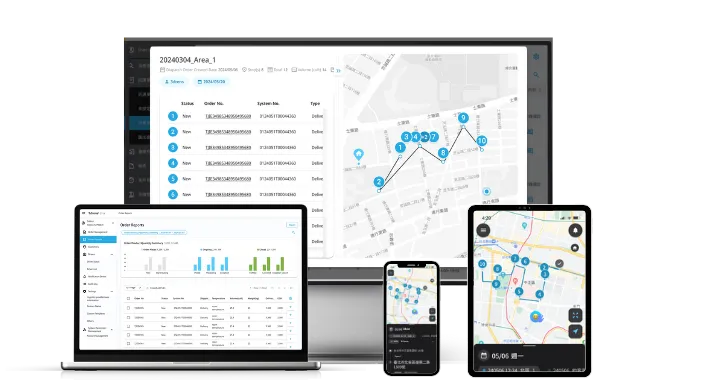
What is fleet management software?
Fleet management software helps businesses manage vehicles, drivers and the transport work they carry out. It is often associated with GPS trackers, but for delivery fleets and brands running their own fleet, most of the daily effort goes into dispatch: which driver takes each order, which route to drive, whether it was delivered, and how to settle up at month end.
3drens InstaTMS is a cloud transportation management system (TMS) built around fleet dispatch and last-mile delivery. With GPS tracking in the driver app and hardware integrations, operators, drivers and customers share the same real-time information on one platform.
Further reading: What is fleet management? Definition, features and how to choose software
Challenges for logistics fleets
- 🚫 Paper dispatch sheets and phone calls that break down as orders grow
- 🚫 Tasks handed out in chat groups: delayed, missed or misread
- 🚫 Rush orders with no fast way to reach drivers and re-route
- 🚫 Customers calling again and again to ask where their delivery is
- 🚫 Driver shortage and high turnover; new drivers who do not know the routes
- 🚫 Month-end payroll and reconciliation across in-house and partner fleets
Fleet management features in InstaTMS
From order intake to month-end settlement, your fleet’s daily work runs in one system
Smart order upload
Import orders by API, Excel upload or manual entry. Fields from different shippers’ ERP and Excel files are mapped automatically, so orders are ready to dispatch in seconds.
AI dispatch & route optimization
Tasks are assigned automatically by address, delivery window, volume and weight, and every driver gets an optimized route. Dispatchers can still reassign or re-route on the fly.
Driver app with GPS tracking
The driver app has built-in GPS. Managers see each driver’s live location and route, while drivers get task details, navigation, delivery photos and e-signatures in one app.
Real-time tracking & ETA notifications
When a driver updates a task, the customer receives an SMS with the estimated arrival time and delivery status, and can follow the order on the InstaTMS order tracking page.
Proof of delivery (ePOD) & settlement
Electronic proof of delivery and surcharge records are attached to every task. Export month-end reports in one click to reconcile with shippers and settle driver pay.
ESG mileage & carbon reporting
Daily mileage and fuel use are recorded automatically and converted to carbon emissions with standard emission factors, ready for ESG and CSR reporting.
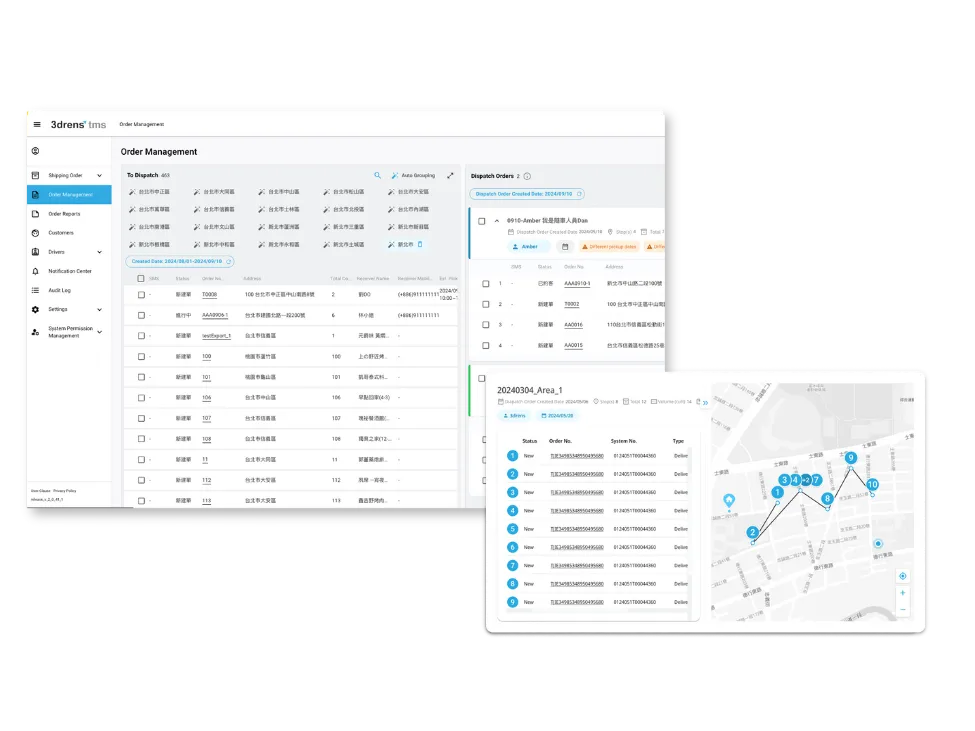
Fleet dispatch: assign automatically, adjust instantly
Easily manage orders and swiftly assign driver tasks. Orders come in by API, Excel import or manual entry, and the system dispatches them by delivery window, location, traffic and cargo volume. Rush orders can be re-dispatched in real time.
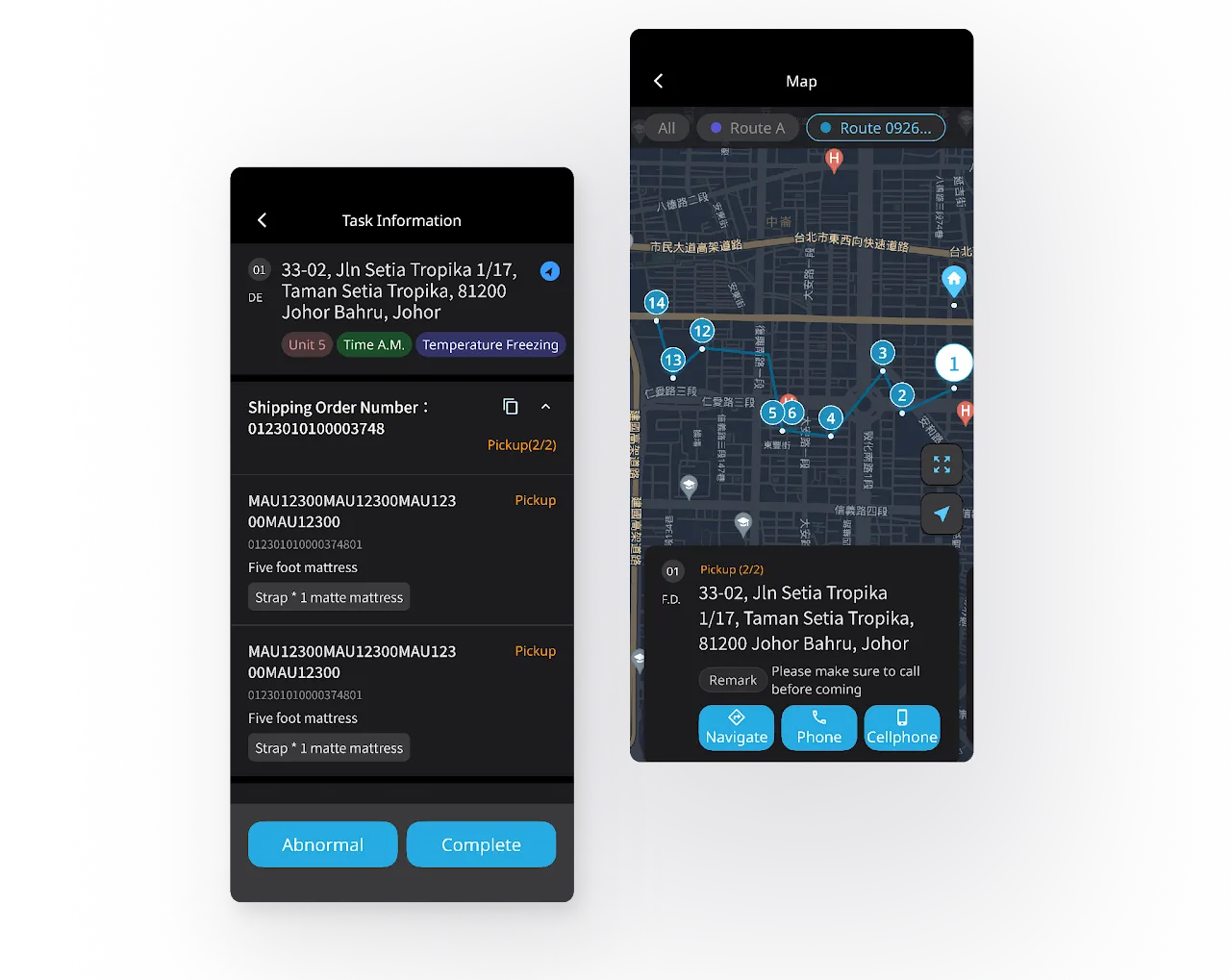
Driver app: everything in one place
Optimal routes, task details and cargo status are delivered to drivers in real time. Photos and e-signatures are captured in the same app, so drivers can stay focused on safe, efficient deliveries.
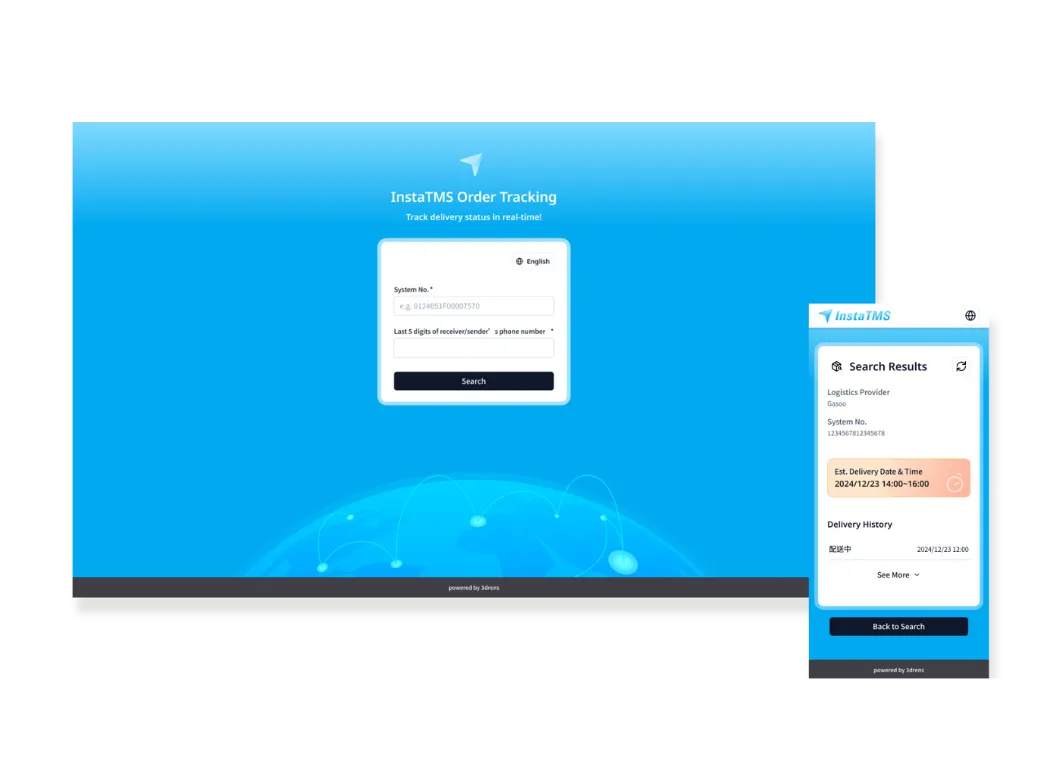
Delivery tracking: keep customers informed
From order-taking to delivery, keep track of the real-time status throughout the entire process. Customers get ETA notifications and can track their order themselves, with reliable proof of delivery at the end.
GPS & temperature hardware integration (HaaS)
As a Qualcomm-certified partner, we integrate Qualcomm Aware Tracker to help you merge hardware services into the 3drens InstaTMS. This allows you to collect GPS tracking data, precise temperature sensing, and other diverse features—all within a single system interface.
Built for cold chain fleets too: vehicle location and temperature data live alongside your delivery tasks. METE, a vaccine transport and cold chain specialist, grew monthly revenue by 40% with InstaTMS.

GPS tracking vs. fleet dispatch software
| Typical GPS fleet tracking | InstaTMS fleet management (dispatch) | |
|---|---|---|
| Main question answered | Where is the vehicle, how far has it driven? | Who delivers each order, by which route, and was it delivered? |
| Order intake | Not covered | API, Excel smart upload, manual entry |
| Dispatch & routing | Usually manual scheduling | AI auto-dispatch and route optimization, adjustable in real time |
| Driver communication | Phone calls, chat groups | Driver app receives tasks and reports status instantly |
| Vehicle location | GPS tracker in the vehicle | GPS in the driver app; optional hardware such as Qualcomm Aware Tracker (HaaS) |
| Customer notifications | Not covered | ETA and status SMS, InstaTMS order tracking page |
| Proof of delivery & billing | Not covered | ePOD, surcharge records, one-click export |
They work together: fleets that already have GPS trackers can bring that data into InstaTMS through HaaS.
Results
Delivery fleets, carriers and brands with their own fleets run on InstaTMS
Fleet management software FAQ
What is the difference between fleet management software and a TMS?
Fleet management software traditionally means GPS trackers that show where vehicles are and how they are driven. A transportation management system (TMS) manages the delivery work itself: order intake, dispatch, route planning, status updates, proof of delivery and settlement. InstaTMS is a cloud TMS built around dispatch, and it also tracks drivers and vehicles through the driver app’s GPS and hardware integrations, so both live on one platform.
Can I see where my drivers and vehicles are in real time?
Yes. The driver app has built-in GPS and reports location while drivers carry out tasks, so managers can see each driver’s live position and route in the web console. For more hardware data, InstaTMS integrates the Qualcomm Aware Tracker through HaaS to collect GPS tracking and temperature sensing data.
Our vehicles already have GPS trackers. Can we still use InstaTMS?
Yes. 3drens offers flexible HaaS (Hardware as a Service) options: whether you already own tracking hardware or need new devices, we connect the hardware data to InstaTMS so location data and delivery tasks are managed in the same system.
Does InstaTMS work for cold chain fleets? Can it monitor temperature?
Yes. Through HaaS, InstaTMS integrates hardware such as the Qualcomm Aware Tracker, so vehicle location, temperature and humidity data are managed in the same system as your delivery tasks, while dispatch, the driver app, tracking and ePOD work as usual. METE, a vaccine transport and cold chain specialist, grew monthly revenue by 40% after adopting InstaTMS.
How do I get started, and how is it priced?
InstaTMS is a subscription SaaS with a 14-day free trial and a 14-day free implementation tutorial. Getting started takes three steps: book a free consultation, have drivers install the app, then log in to the web console and start dispatching.
Can fleet management software track carbon emissions?
InstaTMS records daily mileage and fuel use, converts them to carbon emissions with standard emission factors and exports ESG reports. Route optimization also cuts unnecessary mileage and empty runs.
Start Your InstaTMS Today
- Book a free consultation
- Drivers install the app
- Log in to the web console and start dispatching